Vacation Rentals
The Smart TV Guest-Mode Reset and Remote Control Decontamination Protocol: Stopping Account Hijacking, Sticky Hardware, and Entertainment Failures in Grand Strand Turnovers
A practical operational guide to managing streaming account security, remote control sanitation, and AV connectivity issues during Myrtle Beach vacation rental turnovers.
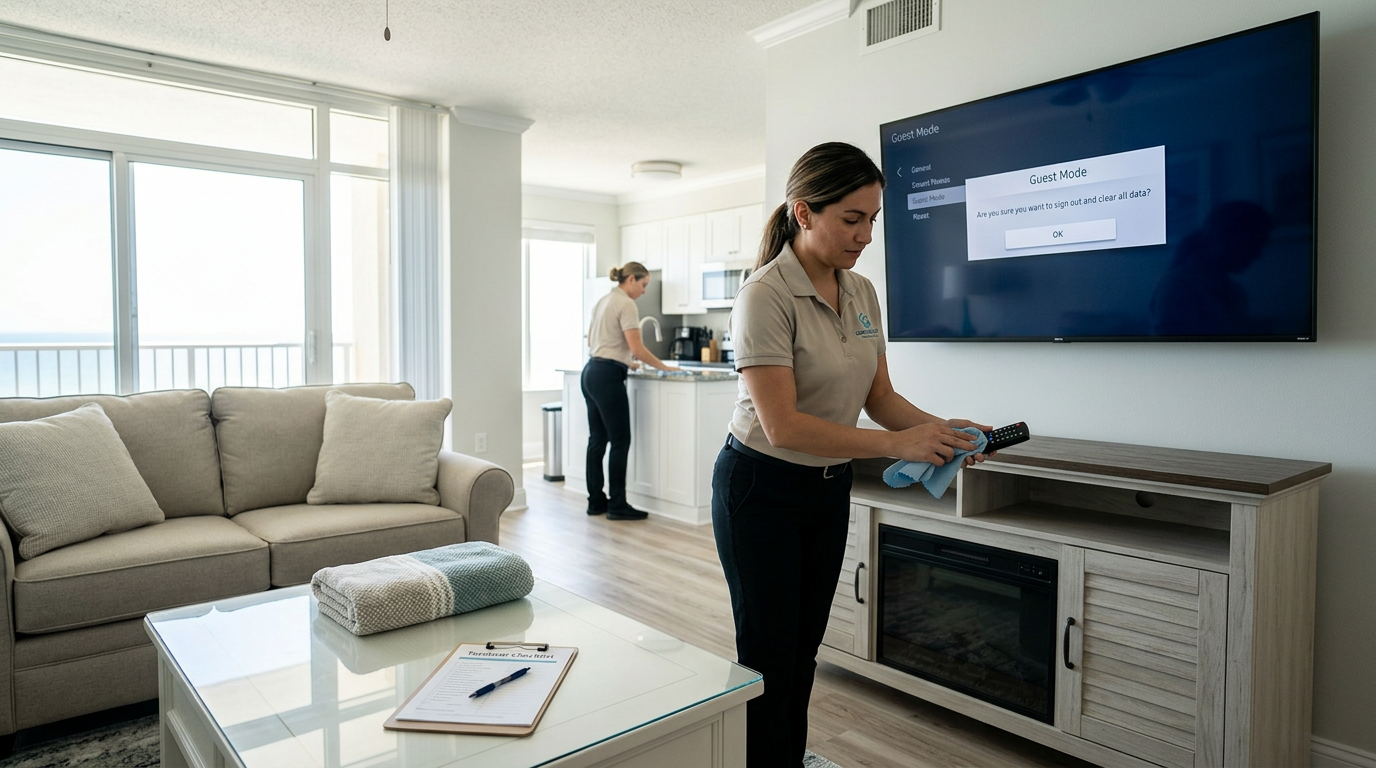
When guests arrive at a Myrtle Beach vacation rental after a long drive down Highway 501, one of the first things they do is turn on the television to unwind. If they are greeted by a sticky remote control, dead batteries, or a screen locked into the previous guest's personal streaming account, their initial impression of cleanliness and hospitality instantly plummets. These small, overlooked technical friction points frequently trigger late-night support calls and lead to damaging four-star reviews on platforms like Airbnb and VRBO. Implementing a systematic tech-turnover protocol ensures that your digital amenities are just as clean, secure, and functional as your freshly laundered linens.
The Entertainment Hub Vulnerability in Modern Vacation Rentals
In the competitive Grand Strand vacation rental market, guest expectations extend far beyond clean floors and crisp sheets. Modern travelers expect seamless, immediate access to their favorite streaming platforms and entertainment systems without friction. Unfortunately, the entertainment center remains one of the most common vectors for early-arrival complaints and low cleanliness ratings. When a guest encounters a remote covered in sunblock residue or finds themselves locked out of TV functions because a previous guest altered the settings, their trust in the property's overall maintenance is broken before they even unpack.
The challenge is compounded by the high-volume nature of seasonal turnovers along the coast. Cleaning teams are focused on deep sanitation, sand extraction, and linen replenishment, meaning that secondary systems like TVs and remotes often get a cursory glance rather than a structured audit. However, because entertainment setup failures require physical intervention or extensive troubleshooting over the phone, they cost property managers valuable time and resource hours. Standardizing this step of the turnover workflow prevents minor technical issues from escalating into costly refund demands.
Security is another critical, yet frequently ignored, aspect of the modern entertainment turnover. Guests routinely log into their personal Netflix, Prime Video, or Disney+ accounts on smart TVs and forget to log out upon departure. This leaves their personal data vulnerable to profile-hijacking or unauthorized purchases by the next guest. By integrating a mandatory tech-cleansing step into your turnaround routine, you protect both the outgoing guest's privacy and the incoming guest's overall user experience.
The Smart TV Guest-Mode Factory and Profile Reset Protocol
To prevent privacy breaches and streaming conflicts, turnover crews must be trained on how to clear user profiles on different TV brands. For properties utilizing Roku devices, the built-in Guest Mode is an invaluable tool. This feature allows guests to select their checkout date, after which the system automatically clears all credentials, search histories, and logged-in accounts. During the turnover inspection, the cleaner or property inspector must verify that the TV screen has returned to the default welcome interface and is ready for the next guest's parameters.
For platforms without an automated checkout feature, such as Samsung Tizen, LG webOS, or Apple TV, manual intervention is required during every single turn. This involves navigating to the settings menu, accessing the account management page, and manually logging out of any active profiles. If a manual logout is too time-consuming due to multiple individual apps, a quick system cache reset or factory reset can be executed. Cleaning partners must be provided with a simple, laminated cheat sheet detailing the button sequences for the specific TV models installed across the rental portfolio.
In cases where TVs are managed through centralized property management software or smart home hubs, checking the dashboard status is essential. If your systems do not support remote logout, your on-site cleaners must make physical verification of the screen status a non-negotiable step before marking the living room as complete. Ensuring the screen displays a neutral, clean welcome screen rather than a stranger's profile immediately signals professional management and instills confidence in the incoming guest.
Remote Control Sanitation and Battery Validation Standards
Remote controls are touchpoint-heavy devices that harbor high concentrations of bacteria, skin oils, sandy grit, and sticky residues from coastal snacks. Standard dusting is insufficient; remotes require physical decontamination using target chemistry that breaks down grease without damaging the underlying sensitive electronics. Cleaners should never spray liquid cleaning agents directly onto a remote, as moisture can seep behind the rubber buttons, corrode the contacts, and cause immediate hardware failure. Instead, they should apply a quick-drying isopropyl alcohol solution to a clean microfiber cloth and thoroughly wipe down all surfaces.
Paying close attention to the crevices around individual buttons is crucial, as this is where sand, dust, and food crumbs accumulate. Cleaners can use a soft-bristled detail brush or a dry cotton swab dipped in rubbing alcohol to gently extract debris from these tight spaces. Once the exterior is clean and dry, the battery compartment must be opened. Salt-heavy air along the Grand Strand accelerates battery terminal corrosion, which manifests as a white, powdery crust that disrupts power flow. Wiping these terminals clean during the turn ensures consistent remote performance.
Battery life must also be proactively tested during every turnover. Relying on guests to report dead batteries leads to frustration, especially if they discover the issue late at night when stores are closed. Cleaners should use a simple handheld battery tester or check the on-screen battery indicator if the TV platform supports it. Keeping a supply of fresh AA and AAA batteries in the cleaner's mobile cart or the property's locked owner's closet prevents delayed check-ins and guarantees that the remote is fully operational.
HDMI and Auxiliary Port Auditing for Gaming Console Overrides
Families traveling to Myrtle Beach often bring along gaming consoles, streaming sticks, or HDMI-compatible laptop setups to keep children entertained. To connect their devices, they frequently unplug the property's default cable boxes, soundbars, or smart TV inputs. When these guests check out, they rarely restore the original wiring configuration, leaving the TV input screen displaying a confusing input error message for the next family. A critical part of the physical turnover inspection is verifying that all HDMI cords are plugged into their correct, designated ports.
Cleaners should trace the cords from the back of the TV to the receiver, cable box, or streaming device to ensure everything is securely connected and powered on. They must then turn on the TV and cycle through the inputs to verify that the default home screen or cable feed loads correctly on the main channel. If a streaming stick like a Fire TV or Chromecast is dangling loose behind the mounted TV due to gravity, it should be secured back in place using zip ties to prevent physical port damage.
For properties with wall-mounted TVs, accessing the rear ports can be physically challenging for cleaning staff. To simplify this process and prevent damage to both the TV mount and the drywall, hosts should install labeled HDMI extension cables that hang slightly below the bezel of the TV. This allows guests to easily plug in their personal gaming devices without tampering with the primary, pre-configured connections behind the screen, keeping the core entertainment setup intact during turnovers.
Soundbar, Subwoofer, and Audio Sync Troubleshooting
Modern thin-screen TVs rely heavily on auxiliary soundbars and subwoofers to deliver clear audio, especially in spacious, open-concept beach condos with tiled floors that bounce sound waves. However, these multi-device audio systems are prone to desynchronization and input drift. During a stay, a guest may accidentally change the input setting on the soundbar using a secondary remote or their phone's Bluetooth. If the audio is routed to the wrong input, the next guest will experience complete silence or a frustrating delay where the video and audio are out of sync.
To prevent this issue, the turnover technician must perform a brief sound check during their final walk-through. They should turn on the television, play a short clip of video content, and confirm that the audio is projecting clearly from the soundbar rather than the tinny, built-in TV speakers. If no sound is heard, they must verify that the soundbar is set to the correct source, such as optical, HDMI ARC, or auxiliary. Ensuring the subwoofer is powered on and paired with the soundbar completes this quick auditory validation.
Labeling is a simple yet highly effective way to prevent guest tampering and streamline the turnover process. Placing small, clear label-maker stickers on the soundbar and remote indicating the correct input setting allows cleaners to verify settings at a glance. It also empowers guests to correct minor issues themselves without feeling the need to call maintenance or leave a negative review complaining about a broken sound system.
The High-Rise Wi-Fi Signal Check and Router Reboot Workflow
High-rise concrete construction, common in oceanfront Myrtle Beach resorts, acts as a natural shield that degrades wireless signals between rooms. In larger floor plans, a router located in the entryway closet may struggle to deliver a stable signal to the master bedroom or balcony. Since streaming entertainment relies entirely on a robust internet connection, verifying Wi-Fi functionality is a crucial component of the turnover tech audit. Cleaners should quickly check their mobile devices or a dedicated connection tool to ensure the property's private network is broadcasting.
If the connection speed is sluggish or the network is unresponsive, a proactive router power-cycle should be initiated during the turn. Unplugging the modem and router for thirty seconds allows the hardware to clear its system memory, resolve local IP conflicts, and re-establish a clean connection with the service provider. This simple step is far more effective when completed during a vacant turnover window than trying to guide an annoyed, checked-in guest through the process over the phone while they are trying to relax.
In addition to checking the signal, cleaners should confirm that the physical Wi-Fi information placard or network card is clean, visible, and placed in a high-traffic area, such as the kitchen counter or living room coffee table. If the network name or password has been changed, or if the QR code for instant connection is smudged or missing, it must be replaced immediately. Providing quick, legible access to the Wi-Fi credentials reduces guest frustration from their very first minute inside the rental.
Integrating Tech Checks Into Your Cleaning Checklist and PMS
To ensure consistency across every reservation, entertainment and technology checks must be formal line items within your property management software (PMS) or digital cleaning checklists. Treating these tasks as optional or secondary guarantees they will be missed during the hectic mid-summer peak season. By requiring turnover specialists to upload a photo of the TV displaying the clean, reset welcome screen and a picture of the sanitized remote resting on the coffee table, you build a layer of accountability that virtually eliminates surprise tech issues.
This structured documentation also serves as critical defense when dealing with platform disputes on sites like Airbnb or VRBO. If a guest claims the TV was broken or the remote was missing upon arrival, you have real-time, time-stamped visual evidence proving the system was fully functional and clean just hours before their check-in. This level of operational detail protects your host rating, minimizes unnecessary refunds, and keeps your property management team aligned on quality standards.
Finally, training your turnover teams to recognize and report physical hardware damage—such as cracked screens, frayed HDMI cords, or loose wall mounts—prevents safety hazards and allows you to order replacement parts before the next booking cycle. Standardizing this feedback loop ensures that your rental property remains in top-tier condition throughout the grueling rental season, protecting your long-term capital investments in home technology.
Vetting Coastal Turnover Partners for Tech-Operational Literacy
Managing modern short-term rentals requires a cleaning partner who understands that their job encompasses more than traditional sweeping, mopping, and dusting. When vetting potential turnover companies in the Myrtle Beach area, hosts should ask specific questions about their experience with technology checks. A truly professional service provider will already have standardized protocols for resetting smart TVs, sanitizing electronics, and verifying connectivity. They will understand the unique challenges of coastal properties and have the systems in place to handle them systematically.
Ask prospective cleaning companies how they train their staff to handle sensitive electronic equipment and whether their inspection apps support real-time photo verification for tech steps. A quality partner will welcome this level of detail because they know it elevates the quality of their work and protects their own team's reputation. Partnering with an operationally literate company gives you peace of mind, knowing that your guests will walk into a rental where every aspect of their experience, both physical and digital, has been carefully verified.
At A2Z Cleaning & Linen Services, we specialize in comprehensive, detail-oriented turnover solutions tailored to the unique demands of Grand Strand vacation rentals. Our highly trained field technicians are fully versed in the exact protocols required to keep your entertainment hubs clean, safe, and fully functional. From deep-cleaning sticky remote controls to executing smart TV guest-mode resets, we ensure your property is ready to earn five-star reviews on every single turn. Contact us at 843.800.2788 to optimize your vacation rental operations today.
- Perform a manual logout of all streaming apps or verify Roku Guest Mode is active.
- Clean remote controls using 70% isopropyl alcohol on a microfiber cloth—never spray liquid directly onto the buttons.
- Inspect remote battery compartments for salt-air corrosion and test power levels before guest arrival.
- Verify all HDMI and audio cables are plugged into their correct, designated ports.
- Conduct a brief sound check to ensure audio is routed correctly through the soundbar rather than internal TV speakers.
- Confirm the physical Wi-Fi information card is clean, accurate, and clearly displayed for the incoming guest.
Key takeaway
A flawless entertainment setup is a cornerstone of a modern five-star guest experience in Myrtle Beach vacation rentals. By integrating smart TV resets, remote sanitation, and connectivity checks into your standard turnover checklist, you eliminate the friction points that lead to negative reviews and late-night service calls. Partnering with a tech-literate cleaning service like A2Z Cleaning & Linen Services ensures your property is always physically and digitally guest-ready.
Keep Reading
Vacation Rentals
The Coastal Ceiling Fan and Vent Dust-Release Protocol: Mitigating Humid Grey Lint, Static-Cling Dander, and Airflow Failures in Grand Strand Rental Turnovers
ReadVacation Rentals
The Under-Bed and Hidden-Zone Clearout Protocol: Preventing Leftover-Item Disputes and Cleanliness Failures in Myrtle Beach Vacation Rentals
ReadVacation Rentals
The Coastal Vacation Rental In-Unit Washer and Dryer Turnover Protocol: Mitigating Sand-Clogged Drums, Damp Gasket Mildew, and Leftover Lint Hazards under Grand Strand Saturday Turn Pressures
ReadReady for a spotless property?
Call 843.800.2788 or request a free quote from A2Z Cleaning & Linen Services.