Vacation Rentals
The Coastal Vacation Rental Smart TV, Remote Control, and Media Console Turnover Protocol: Mitigating Sticky Sunscreen Residues, Sand-Choked Ports, and Guest Streaming Profile Reset Failures under Grand Strand Saturday Turn Pressures
A master turnover protocol for Grand Strand vacation rental entertainment centers, addressing salt-air port corrosion, sunscreen-stained remotes, and digital privacy resets.
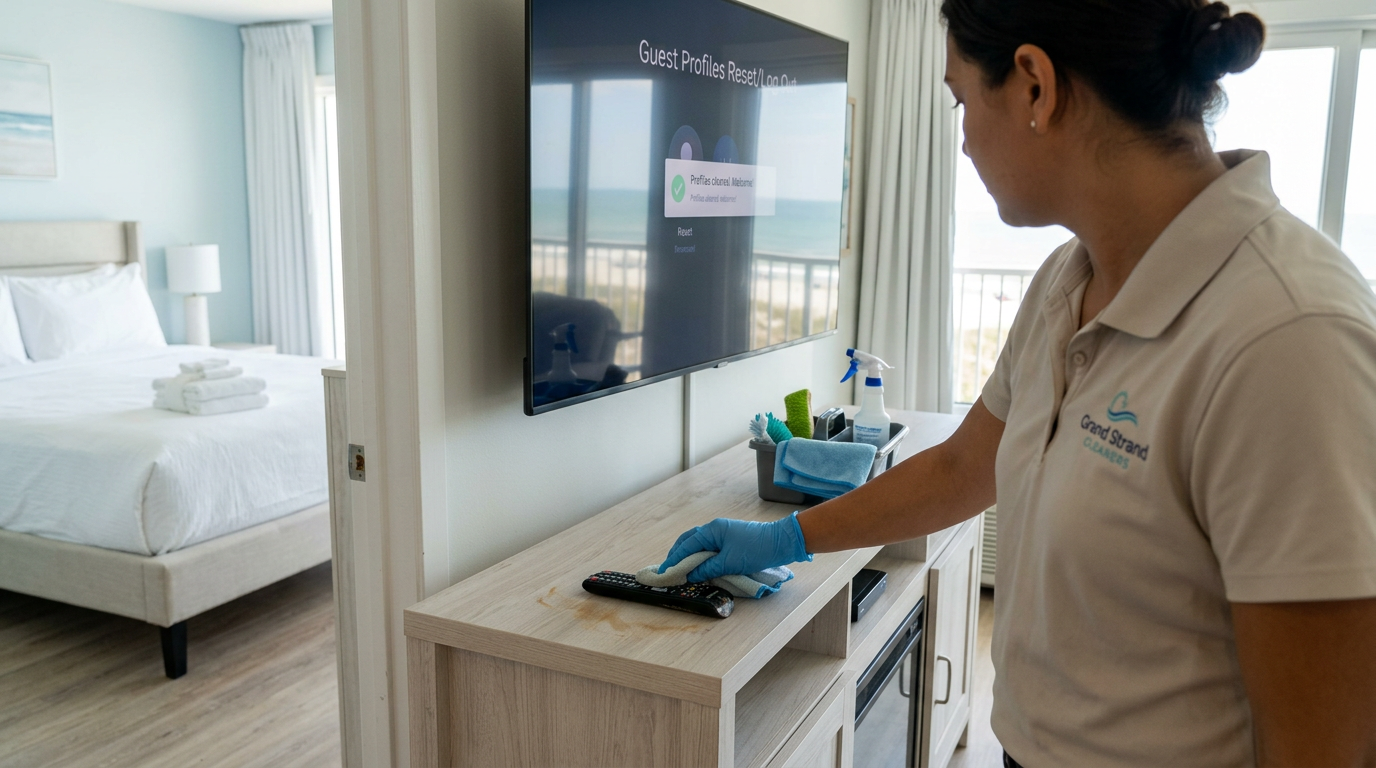
When guests arrive at a Grand Strand vacation rental after a long, humid day on the beach, their first instinct is often to collapse onto the sofa and turn on the television. If they are greeted by a remote control sticky with sunscreen residue, a TV screen obscured by salt haze and fingerprints, or a streaming platform locked into the previous guest's account, their vacation experience starts with immediate friction. These small, highly visible details frequently dictate the tone of the guest's initial review. Implementing a strict, standardized turnover protocol for your media center ensures that these high-touch electronics remain clean, functional, and secure during the intense Saturday turn window.
The High Stakes of the Media Console in Coastal Guest Satisfaction
In the competitive Myrtle Beach vacation rental market, the living room media console acts as a visual anchor and a central hub for guest entertainment. While guests spend their days enjoying the beach and local attractions, their evenings are spent gathered around the television. Because this area is a focal point of relaxation, any oversight in cleanliness or functionality is noticed almost immediately. A dusty TV stand, a smudged screen, or a malfunctioning remote control signals to guests that the property was rushed through cleaning, which can lead to critical inspection of other areas of the home.
Operational issues with smart televisions are among the most common reasons guests contact property managers during their stay. These calls not only disrupt the guest's vacation but also strain property management resources, requiring emergency maintenance dispatches during peak weekend hours. By integrating a systematic media check into your standard Saturday turnover workflow, you can prevent these complaints before they occur. This proactive approach protects your property's reputation, maintains high ratings on booking platforms, and reduces operational overhead.
The coastal environment of the Grand Strand introduces unique challenges for electronics that are not present in inland markets. High humidity, airborne salt particles, and fine beach sand constantly infiltrate properties, settling on and inside sensitive electronic components. Standard dusting methods are insufficient to combat these coastal elements. This protocol provides housekeepers and inspectors with a clear, step-by-step method to safely clean and maintain these delicate systems under tight turn pressures.
The Chemistry of Cleaning Sunscreen-Coated Remotes
Remote controls are among the most heavily handled items in any vacation rental, making them breeding grounds for bacteria, skin oils, and coastal grime. On the Grand Strand, these devices are regularly coated in waterproof sunscreens, tanning oils, and fine beach sand. Sunscreen contains organic lipids and inorganic metal oxides, such as zinc oxide or titanium dioxide, which create a resilient, sticky film. When this film binds with airborne sand, it forms a gray, abrasive crust that clogs the spaces around the rubber buttons, rendering the remote difficult to use and deeply unhygienic.
Cleaning these sensitive electronics requires specialized chemistry to break down the waterproof sunscreen lipids without damaging the delicate printed circuit boards inside. Standard water-based all-purpose cleaners must never be sprayed directly onto remotes, as liquid intrusion can permanently short out the contacts. Instead, housekeepers should utilize 70% isopropyl alcohol applied to a clean, lint-free microfiber cloth. Isopropyl alcohol acts as a rapid solvent for oils, sanitizes the surface, and evaporates quickly, minimizing the risk of moisture damage to internal components.
To clean the remote, lightly dampen the microfiber cloth with the alcohol solution—it should feel moist, never dripping. Gently wipe down all surfaces of the remote, paying close attention to the crevices between the buttons. For stubborn sunscreen buildup around individual keys, use a dry, soft-bristled toothbrush or a wooden toothpick to gently dislodge the crust before performing the alcohol wipe. This meticulous cleaning process restores the tactile feel of the buttons and provides arriving guests with a clean, germ-free device.
Mitigating Salt-Air Corrosion and Sand-Choked HDMI and USB Ports
The salt-laden air of Myrtle Beach is highly corrosive to the delicate copper, silver, and gold connections found in smart TVs, gaming consoles, and streaming devices. When high humidity combines with microscopic salt crystals, it accelerates galvanic corrosion on exposed port contacts. This corrosion presents as a dull, greenish-white crust inside HDMI and USB ports, causing intermittent signal drops, static on the screen, or total connection failure. Furthermore, guests frequently unplug cables to connect their own gaming consoles, exposing these delicate ports to drifting sand.
To prevent port failures, housekeepers and inspectors must check the back of the TV and media consoles during every turn. Visual inspections should confirm that all HDMI, USB, and power cables are seated firmly in their ports and are free of sand accumulation. If sand or dust is visible within a port, it must never be cleared with a damp cloth or a metal tool, which can bend the internal pins or cause a short circuit. Instead, use a canister of compressed air to clear the debris.
When using compressed air, hold the canister upright to prevent liquid propellant from spraying onto the contacts. Deliver short, controlled bursts of air from a distance of two to three inches to dislodge sand and dust from the ports. If salt oxidation is visible on the cable connectors, wipe the metal tips with a dry microfiber cloth dampened with a drop of electronic-safe contact cleaner. Keeping these connections dry, clean, and tightly sealed prevents costly hardware replacements and ensures guests can stream content without interruption.
The Digital Cleansing Protocol: Resetting Guest Streaming Profiles
Modern vacation rental guests expect smart TVs to be ready for use, but they do not want to navigate the private profiles of the previous occupants. Leaving a prior guest logged into Netflix, Prime Video, or Disney+ is a major privacy concern and a common source of guest frustration. New arrivals are often blocked from logging into their own accounts, or they may accidentally purchase movies using the previous guest's saved credentials. Standardizing a digital reset process is now a fundamental component of professional vacation rental housekeeping.
The manual process of navigating to the settings menu of every individual streaming app to log out is too time-consuming for a busy Saturday turn. To streamline this workflow, property managers should utilize smart TVs or streaming sticks that feature a dedicated 'Guest Mode' or 'Auto-Sign Out' schedule. For example, Roku devices offer a Guest Mode that allows hosts to set a specific checkout date, at which point the device automatically logs out of all guest accounts, clears search history, and prepares the TV for the next arrival.
If your devices do not feature automated guest modes, the checkout housekeeper must perform a quick manual factory reset or profile clearance as part of their final staging checklist. This is accomplished by navigating to the main system settings and selecting the 'Reset' or 'Sign Out of All Accounts' option. Verifying that the television displays the clean, default welcome screen ensures that arriving guests feel secure, valued, and in control of their digital environment from the moment they power on the device.
Safely Restoring TV Screens: Eliminating Sunscreen Smudges and Salt-Haze
Television screens are highly sensitive substrates that require specialized care to prevent permanent damage. Guests, especially young children, frequently touch screens with hands coated in sunscreen, salt water, and snack grease, leaving behind ugly smudges. Over time, the high-humidity coastal air also deposits a fine, dull salt haze across the display. Standard household glass cleaners containing ammonia, alcohol, or acetone must never be used on modern LCD, LED, or OLED screens, as these harsh chemicals strip the anti-reflective coatings and cause permanent clouding.
The correct method for cleaning a television screen involves a two-step dry and damp microfiber process. First, use a clean, dry, ultra-soft microfiber cloth—specifically designated for electronics to prevent cross-contamination with sand grains from other surfaces—and gently wipe the screen in circular motions to remove dust and loose sand. This dry wipe prevents sand particles from scraping across the screen during the subsequent damp wipe, which could cause permanent scratches.
Next, if greasy smudges or sunscreen fingerprints remain, lightly mist a small amount of distilled water or a dedicated, polymer-safe electronic screen cleaner onto the microfiber cloth. Never spray any liquid directly onto the screen itself, as droplets can run down the panel and seep into the delicate bezel electronics, shorting out the entire unit. Gently wipe the dampened cloth over the smudged areas using light pressure, then buff the screen dry with a clean section of the dry microfiber cloth to achieve a streak-free, crystal-clear display.
Under-Console Wire Management, Dust-Bunnies, and Sand Drift
The space beneath and behind the media console is a notorious hiding spot for dust, lint, pet hair, and drifting beach sand. Because these areas are low to the ground and partially obscured, they are easily overlooked during rapid turnovers. However, guests frequently look behind the TV console to plug in phone chargers, baby monitors, or children's gaming devices. Discovering a cluttered tangle of dusty wires and accumulated sand dunes behind the console immediately shatters the clean aesthetic of the property.
During the turnover, housekeepers must pull the media console slightly away from the wall to sweep or vacuum the floor beneath it. Use a vacuum crevice tool to extract sand and dust from the baseboards and the back vents of the console furniture itself. Once the floor is clear, organize any loose cords using hook-and-loop cable ties. Grouping cables together and securing them off the floor not only makes future cleaning easier but also prevents guests from accidentally unplugging essential devices when reaching behind the unit.
Inspect the interior shelves of the console where cable boxes, DVD players, and game consoles reside. These warm electronics attract dust and pet hair, which can block cooling vents and cause the devices to overheat and fail. Wipe these shelves and the exteriors of the devices with a dry anti-static microfiber cloth. Ensuring that this entire zone is dust-free and orderly conveys a high standard of professional care that guests will appreciate the moment they interact with the entertainment system.
Remote Control Battery Maintenance and Corrosion Prevention
A dead remote control is a frustrating inconvenience that often results in an immediate service call to the property manager. In the hot, humid climate of the Grand Strand, alkaline batteries are prone to accelerated degradation, leading to chemical leakage and terminal corrosion. This leakage manifests as a white, powdery acid crust inside the battery compartment, which ruins the metal contact springs and cuts off power to the remote. Regular battery inspection is essential to ensure operational reliability.
As part of the turnover protocol, housekeepers must open the battery compartment of every remote to check for signs of leakage, corrosion, or battery swelling. If any white residue is present, the remote must be cleaned or replaced. Minor corrosion can be cleaned using a cotton swab dipped in white vinegar or lemon juice to neutralize the alkaline crust, followed by a light scraping of the contact springs with a small brush. Once dry, fresh batteries should be installed.
To maintain a high standard of efficiency, housekeepers should carry a standardized par stock of AA and AAA batteries in their cleaning kits. Never mix old and new batteries, or different brands, within the same remote, as this uneven discharge rate increases the risk of battery leakage. Finally, test the remote's functionality by aiming it at the TV and cycling through the power and volume buttons. This quick, five-second verification guarantees that the guest will have a fully functioning remote upon arrival.
A2Z Cleaning & Linen Services: Your Grand Strand Vacation Rental Partner
At A2Z Cleaning & Linen Services, we understand that managing a successful vacation rental on the Grand Strand requires meticulous attention to every single detail. Our professionally trained turnover specialists are experts in the unique demands of coastal property care, ensuring that high-touch electronics like smart TVs, media consoles, and remote controls are thoroughly cleaned, sanitized, and reset for every arriving guest. We combine advanced training with strict quality control to protect your property and secure positive guest reviews.
We utilize specialized, electronics-safe cleaning agents and microfiber technology to eliminate stubborn sunscreen oils and salt haze without damaging your expensive media investments. Our comprehensive checklist covers everything from digital profile resets to battery checks and cable management, ensuring that your guests enjoy a flawless entertainment experience from the moment they check in. By outsourcing your turnover cleaning to our experienced team, you can reduce maintenance calls, save time, and scale your rental business with confidence.
Do not let dusty consoles, sticky remotes, or streaming connection failures compromise your property's earning potential and guest satisfaction ratings. Partner with a local, family-owned cleaning company that understands the precise operational standards required to excel in the competitive Grand Strand vacation market. Contact A2Z Cleaning & Linen Services today at 843.800.2788 to discuss our tailored vacation rental turnover packages and schedule your next service.
Key takeaway
Maintaining pristine, functional smart TVs and sanitized, sunscreen-free remotes is vital for securing five-star reviews on the Grand Strand. By establishing a systematic turnover protocol that addresses salt-air corrosion, digital profile resets, and gentle screen care, property managers can eliminate common guest pain points and reduce operational service calls. Trust the professional team at A2Z Cleaning & Linen Services to execute these precise details perfectly during every Saturday turn.
Keep Reading
Vacation Rentals
The Coastal Vacation Rental Refrigerator, Freezer Ice Maker, and Door Gasket Turnover Protocol: Mitigating Fish-Odor Cross-Contamination, Sandy Ice-Chute Blocks, and Gasket Mildew under Grand Strand Saturday Turn Pressures
ReadVacation Rentals
The Coastal Vacation Rental Sliding Glass Door Track, Handle, and Balcony Screen Turnover Protocol: Mitigating Sandy Roller Jamming, Salt-Crust Locks, and Smudged Ocean Views under Grand Strand Saturday Turn Pressures
ReadVacation Rentals
The Grand Strand Vacation Rental Housekeeping Quality Assurance and Field Inspector Career Pathway: Technical Diagnostic Protocols, Behavioral Interview Blueprints, and Peak-Season Compensation Models
ReadReady for a spotless property?
Call 843.800.2788 or request a free quote from A2Z Cleaning & Linen Services.